
A practical guide to using AI in your job huntThe ultimate guide on how to stand out as an applicant while saving dozens of hours in the process
✨ Hey there this is a free edition of next play’s newsletter, where we share under-the-radar opportunities to help you figure out what’s next in your journey. Join our private Slack community here and access $1000s of dollars of product discounts here.
Looking for jobs is a lot of work.You need to research companies you’re interested in, hope they have job openings that match your profile, customize your application to them, and then prepare for and ace interviews. And even if you get an offer, you’re not done: You still need to negotiate and, if you’re lucky to get multiple offers, decide which one to take. Since all of this is so much work, most people opt for one of two extreme approaches:
Unfortunately, neither approach is great. The first approach will burn through a lot of good opportunities with subpar results because you’re not putting your best foot forward with each individual application. In a competitive market, that’s a recipe for disappointment. In the second approach, you’re ignoring the fact that even if you’re a great candidate for a role, there’s always luck involved; relying on a small handful of applications means there’s a real chance you won’t get any interviews or job offers, even if you’ve polished everything to perfection. So, what should you do instead? Luckily, nowadays there’s a third option that allows you to combine the best parts of both approaches above: Use AI to identify high-fit companies and automate the grunt work so you can build a strong top of your application funnel, and then customize each application to maximize your chances of getting an interview and finally an offer. In this post, we’ll go through exactly how to do that, including detailed prompt examples you can use immediately. Specifically, we’ll cover how to use AI to:
Let’s dive in. Phase 1: Preparing for your job hunt🎯 Goals:
🤖 AI use case #1: Using AI as an advisor to find your dream roleAlmost everyone I know in tech that loves their job got it through some sort of coincidence. They met someone who had an interesting job and applied for similar roles, or they took an internal transfer opportunity to another team. That’s not crazy if you consider that most tech roles are fairly new and university career advisory programs etc. don’t really know much about them. But in the age of AI, we don’t have to wait for serendipity anymore and can take a more intentional approach. As long as you share the right context, AI chatbots are great at giving you targeted recommendations for roles you might like. Here’s a template you can try (just replace the parts in bold with your information):
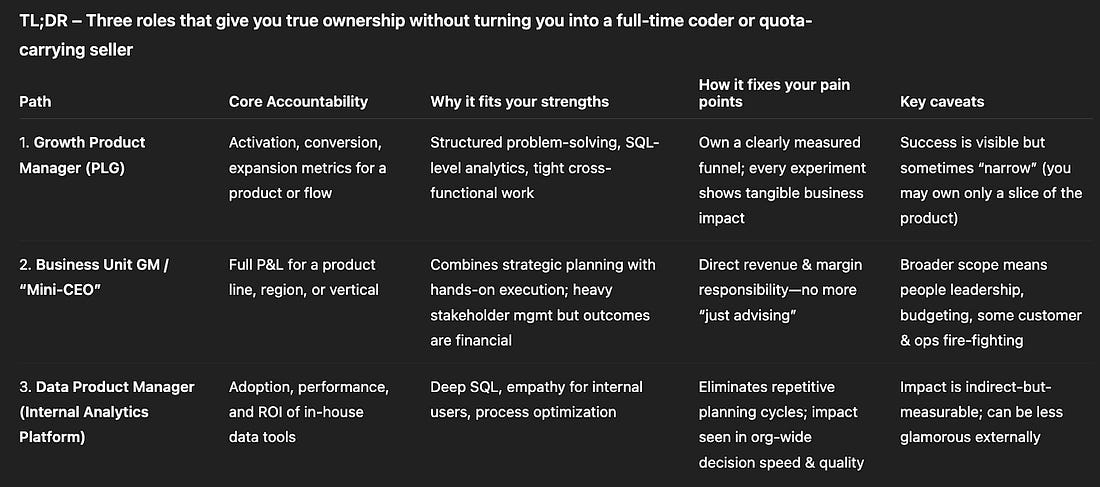
In the example below, I used this prompt to explore options for a BizOps manager that wants more ownership. After asking me a few clarifying questions, ChatGPT suggested three roles that fit my criteria.
Full example answer from ChatGPT In addition to a succinct overview, it also gave more detail on what you’d actually do day-to-day in these roles, why they might be a good fit, what to watch out for, and how to choose among them. 🤖 AI use case #2: Ask AI to review & optimize your LinkedIn profileHaving an up-to-date, optimized LinkedIn profile is helpful for at least two reasons:
If you’re like me, though, you probably hate keeping your profile up to date. Luckily, you can massively reduce the time it takes by asking AI to review and feedback your profile and then implementing the handful of suggestions that seem most promising. A simple prompt like this will already give you plenty to work with:
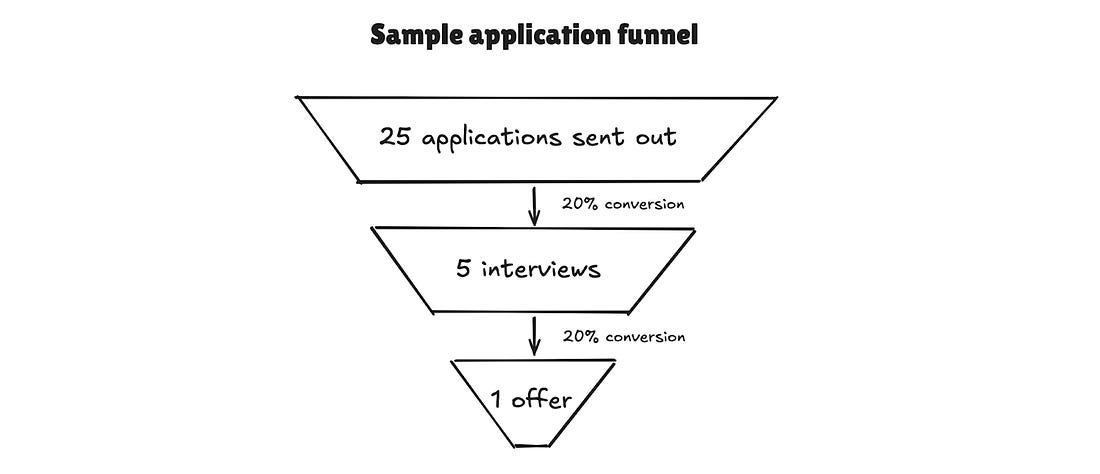
When I did this for my profile, Perplexity correctly concluded that I was missing key pieces; e.g. I wasn’t highlighting all relevant skills or properly showcasing the impact I drove in my past roles. Note: Since the AI is trained on a lot of influencer content, it tends to include a few suggestions that are not to everybody’s taste (e.g. I don’t want to use a super long “influencer-style” headline like Perplexity proposed). Just pick the pieces that you’re comfortable with and can implement with reasonable effort. Phase 2: Looking for open jobs🎯 Goal: Compile a list of open jobs that fit your criteria with minimum manual effort Mental model: Treating your job hunt like a funnelI recommend thinking about your job search as a “funnel”; regardless of how strong your profile is, you need to apply to a lot of jobs to get at least one offer at the end. Example: Let’s say in an optimistic scenario, you hear back from one out of five applications you submit, and you get an offer from one out of five interview processes you go through. That means you’d need 25 applications for just one offer.
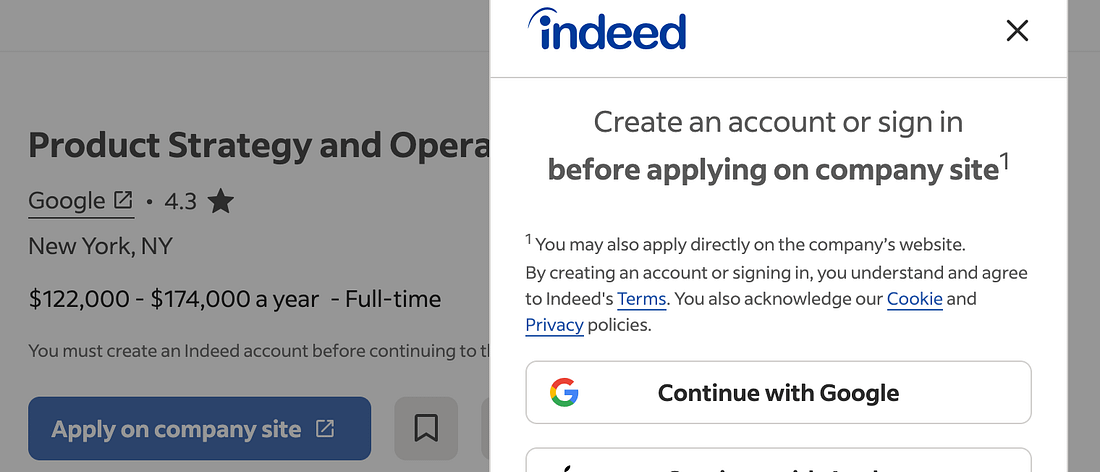
And in reality, “conversion rates” often look even lower than that. So I recommend you aim to compile at least 50 - 100 job openings to start; then, you can work through them step-by-step starting with the most attractive ones. 🤖 AI use case #3: Compiling a master list of open jobsCommunities like Next Play are awesome to get access to a constant stream of relevant opportunities. But if you want to build a strong top-of-funnel for an active job search, you need to complement this with proactive research. However, searching Google or job boards manually can be very time consuming, and extremely frustrating. For example, when I googled “Strategy” jobs and found this listing from Google itself, it didn’t have a link to the careers page; instead, it just linked out to a bunch of job portals:
Which then required me to create an account before getting to the actual job listing:
That’s why I recommend outsourcing this work to AI. This way, you can get a list of curated job opportunities with links directly to the ATS postings or company career pages. The research functions of ChatGPT, Claude etc. are not a great fit here because they use a lot of cached results and will often give you lists of outdated job postings. Perplexity, on the other hand, does a decent job if you explicitly tell it to focus on live, verified listings on ATS systems:
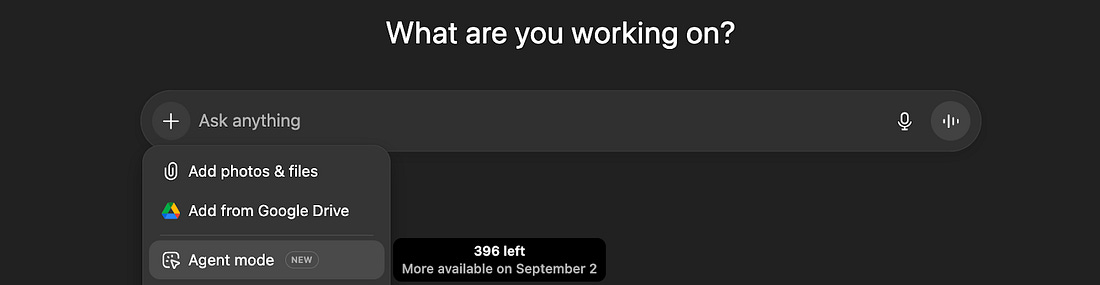
Here’s an example output report based on a Product Manager job search (most of the listings are probably offline by the time you’re reading this, but they were all working at the time of the search). You’ll get even better results, though, if you have a premium subscription to ChatGPT and use Agent Mode. I recommend the following workflow:
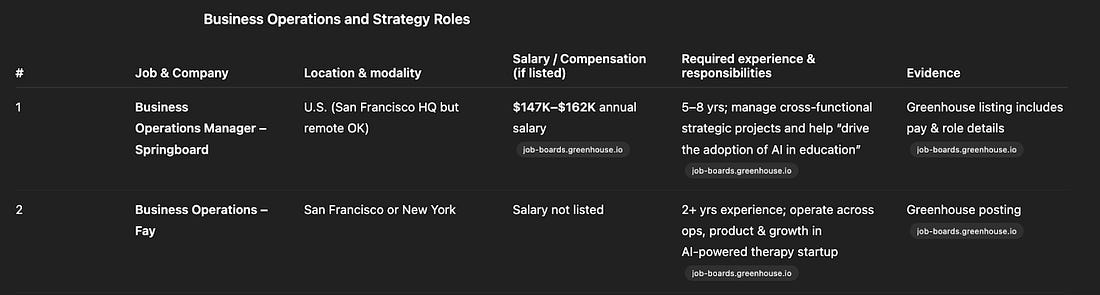
This is what I got back from ChatGPT after ~20 minutes when asking for BizOps roles with an AI focus:
It’s not perfect (e.g. a few of the job postings don’t adhere to the location restrictions I gave and some roles are too junior), but overall it’s a great starting point and only took me less than 5 minutes of work. Phase 3: Applying for jobs🎯 Goal: Become a stand-out candidate with a customized application with minimal time investment Even if you’re applying for many jobs, you should aim to customize each application to maximize your odds of getting an interview. Obviously, you won’t have time to do this completely manually and put in the same amount of effort for every application. That means you need to:
Then, you can do the bare minimum customization for every single application and put in extra effort to stand out for the top ~5 jobs you’re most interested in. AI use case #4: Optimizing and customizing your resume & drafting cover letters (if required)Before you start tailoring your resume to specific positions, it’s a good idea to give it a generic overhaul to make sure it adheres to best practices like focusing on the impact you drove rather than responsibilities you had in each role. Resume best practices are well-documented, so LLMs have lots of relevant training data and can give you a solid assessment:
This version will then be the basis for the next step: Customizing your resume to highlight the most relevant things for each application.
To do this, first create a document with all of the job postings you’re planning to apply to. Then, if you want to go the extra mile, use Deep Research to gather more information on the companies (see below under use case #7 for tips and prompt examples). Finally, upload the document with the job postings, the report from Deep Research (if you have it), and your generic resume and ask your favorite LLM (I use ChatGPT) to do the following:
Note: I don’t recommend having the AI directly create customized resumes for you, for a simple reason: It doesn’t have any context besides what’s already in your resume. So in cases where it would be good to highlight additional relevant skills or experiences, it would have to make something up. As a result, it’s better to use AI to get feedback on what you can improve, and then implement those improvements yourself. Finally, if the job posting is asking for a cover letter, AI can help with this. Here’s my rule of thumb:
AI use case #5: Creating deliverables that let you stand out99% of applicants send in just a resume (plus a cover letter, if required). And you can definitely get jobs that way, even today. But: Doing something special massively increases the odds that you get noticed, and that’s especially important if you’re recruiting in an area where there aren’t that many openings (and therefore you won’t get that many “shots on goal”). The first step is to come up with ideas. You can use any general-purpose AI chatbot for this, but I personally find Claude particularly helpful.
Example transcript from Claude The more context you add, the better the results will be. I recommend adding the following to the base prompt above:
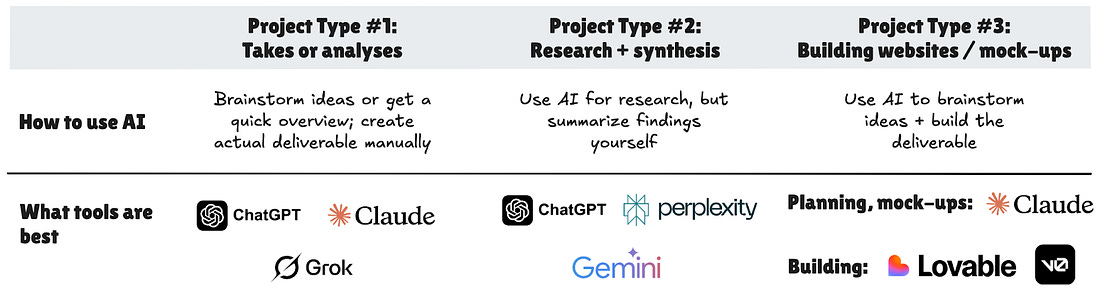
And if you’re not happy with the first set of ideas or just want more, keep pushing back until you’re satisfied. Then, it’s time to implement your chosen idea(s). Which AI tool you should use, if at all, depends on the specific idea. Let’s take some examples from the list of ideas Claude generated above for standing out in AI PM applications:
AI use case #6: Identifying hiring managersWhile it doesn’t work every time, messaging hiring managers directly instead of going through the regular application funnel can increase your chances of getting a foot in the door (esp. if you combine it with a unique tactic to stand out from above), so it’s worth giving it a shot.
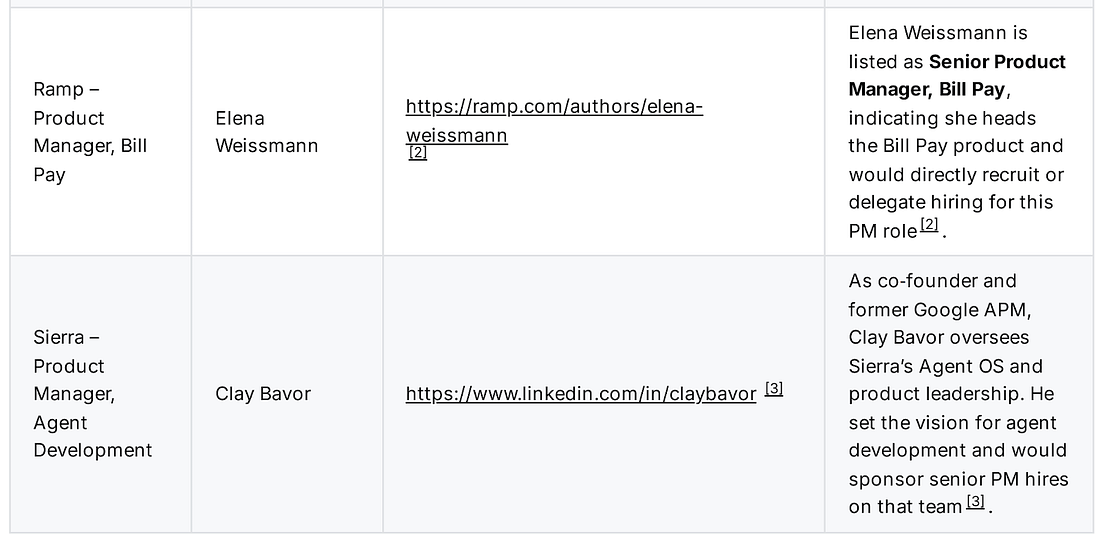
Perplexity does a decent job at this by browsing company websites as well as LinkedIn profiles and posts. If you give it a list of jobs as a CSV together with this prompt…
… you’ll get back a list like this:
Full example report from Perplexity In some cases, it didn’t find a good candidate, but other times it was spot on (e.g. it found a PM lead promoting roles on the exact team that the job opening was on). Phase 4: Preparing for interviews🎯 Goal: Deeply understand the company, anticipate likely questions, and practice how to solve them Using AI for interview prep might be the most underrated use case. There are specialized tools, but the general-purpose ones like ChatGPT and Claude can get you very far. AI use case #7: Researching the companyWith AI to help you research, there is no excuse anymore to show up to an interview unprepared. Many candidates still do, though, so if you deeply understand what the company does and how it’s positioned etc., you’ll definitely stand out. I recommend using ChatGPT Deep Research to look into the following:
Here is what an effective prompt for this looks like:
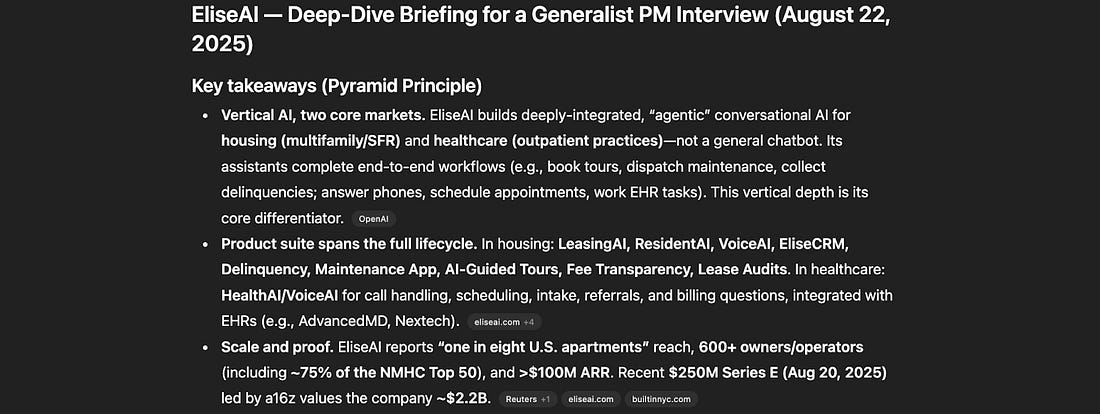
And you’ll get back an in-depth report like this:
Full report from ChatGPT Deep Research Note: You can also get ideas for questions you can ask during the interview process from the report. Getting some inspiration this way is fine; but I highly recommend you do your own thinking as well. Asking questions is the opportunity to show genuine curiosity and how you’re thinking about the company, so try to be authentic instead of just reciting what AI came up with. They want to hire you, not Claude or ChatGPT. AI use case #8: Researching the interview processThe second important area you should dig into is the interview process itself. Especially if you’re applying for larger companies that have been around for a while, there will be a lot of information online that AI can find. Here’s how you can get an actionable overview via the Deep Research feature in the tool of your choice:
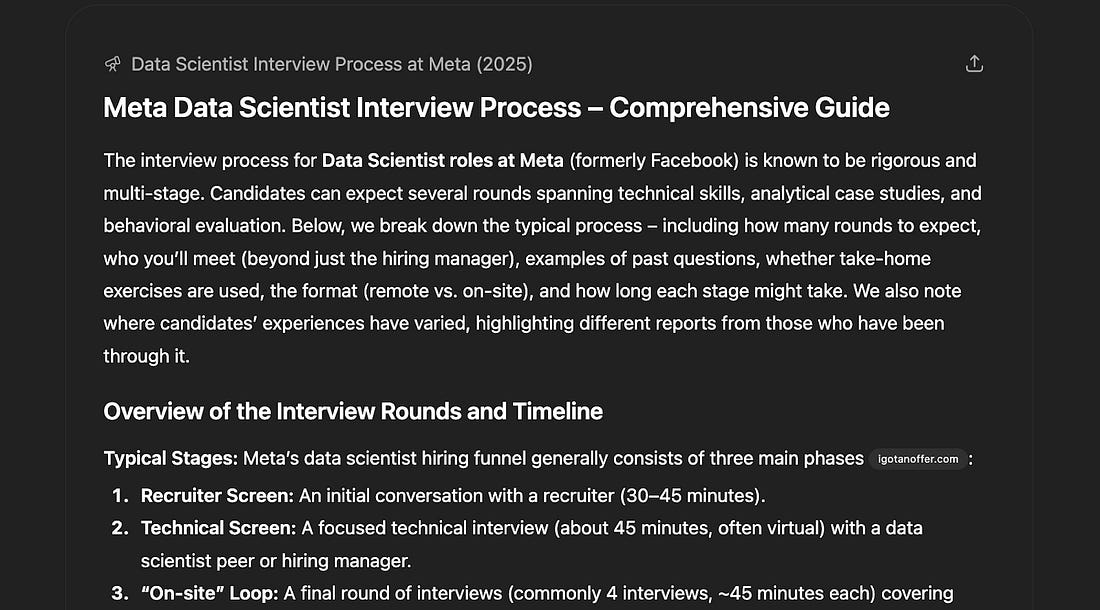
Now, instead of browsing dozens of websites or forum posts, you can just read one single, dense report:
Example report researching the Data Science interview process at Meta You’ll still have to practice (see below), but it already helps a lot to feel like you’re deeply familiar with the process and know what types of questions to expect.
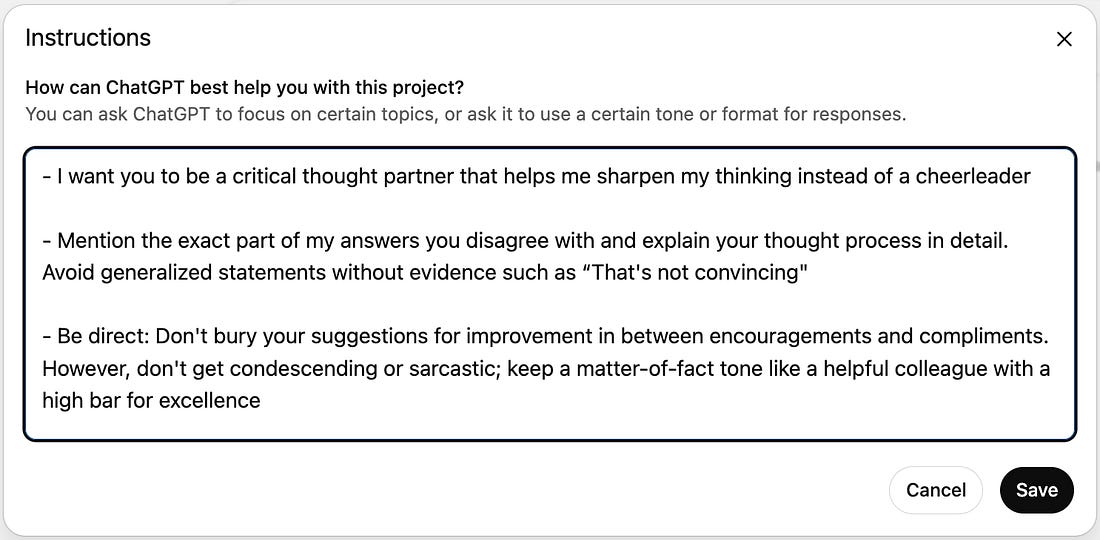
When you pull up to the interview after researching likely questions AI use case #9: Practicing interview questions🎯 Goal: Practice in a low-stakes environment until you’re confident you can handle any type of question In the early years of my career, practicing interviews was painful. You had to find and coordinate with others to practice behavioral and case study questions, and practicing hard skills like SQL meant taking clunky and generic online courses that had little in common with what you’d actually be asked to do in interviews or on the job. With AI chatbots, this process is so frictionless it can actually be fun. My favorite tool for this is ChatGPT, but Claude and others do a decent job, too. To get started, the very first thing you should do is to give custom instructions. Without them, AI is often too encouraging, so if you want to pressure-test your approach as much as possible before the real interview, you have to configure it to be a bit more critical:
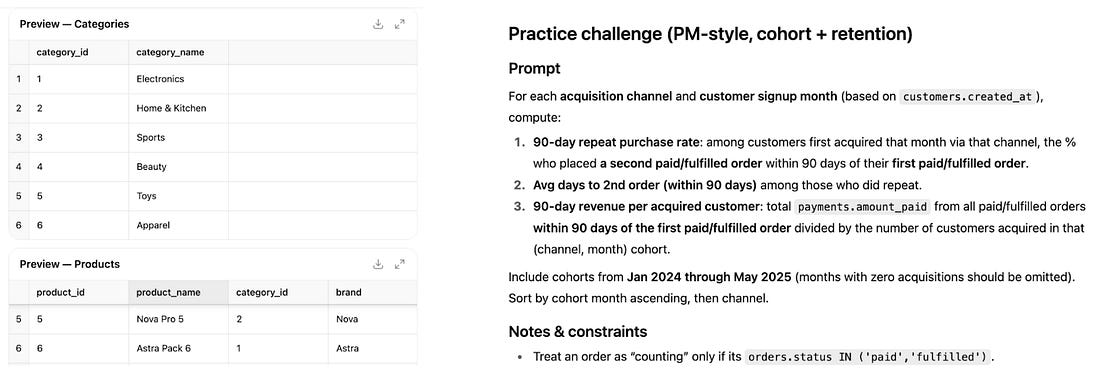
Then, share the exact job opening you’re interviewing for so the AI can provide customized responses. Once you’ve done the above, you can practice literally anything. For example: Behavioral questions Ask the AI to come up with likely behavioral questions, answer them (e.g. via voice mode), and then ask it to help you fine-tune how you deliver your anecdotes to perfectly demonstrate the relevant skills. Practice coding or SQL Even though this is not a built-in feature in general-purpose LLMs like ChatGPT, you can create your own training environment with a simple prompt. Let’s say you want to practice SQL, and you’re applying for an e-commerce company. This prompt will allow you to practice SQL right in the chat interface and get detailed feedback to help you improve quickly:
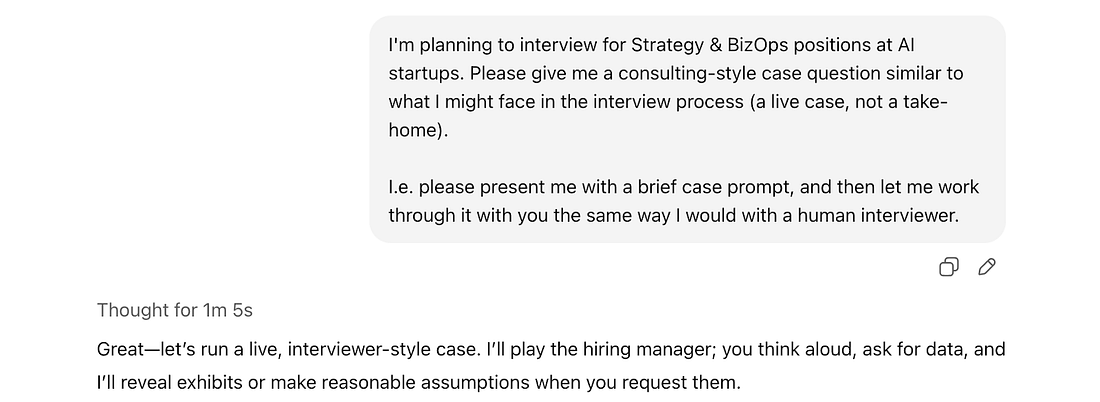
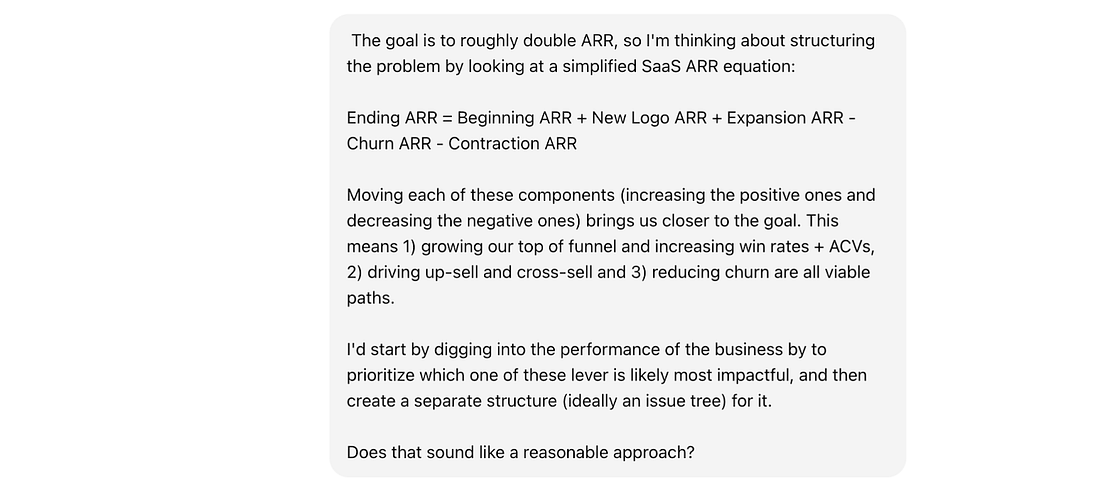
Practice case studies Whether you’re applying for BizOps, Chief of Staff, Product Management, Growth, or Analytics positions, chances are you’ll be given a case study. This can take different shapes; for example, on the interview day, you might be given an assignment to work on by yourself that you’ll then present an hour or two later. Or, you’ll be asked to work through a problem in real-time with an interviewer. These types of interviews can feel high-pressure and, in my experience as both a candidate and interviewer, are often the ones that decide whether a candidate passes or not. The best (and frankly only) way to get good at them is to practice a lot, and AI makes this easy. Let’s take the consulting-style cases where you need to solve a problem live. The key in these types of interviews is to structure your answer well and walk the interviewer through your thought process; that’s way more important than the actual answer you arrive at. You can kick off a practice run with a simple prompt like this:
Then, after the AI gives you a brief overview of the case, there are several aspects you can practice:
AI use case #10: Learning from mistakesInterviewing is a skill like any other, so the same rules apply. Most importantly: Practice makes perfect. Your first interviews will likely be challenging if it’s been a while since your last job hunt. But instead of seeing an interview that didn’t go as planned as a defeat, treat it as a learning opportunity. After the interview is over, while your memory is fresh, take notes, focusing on the parts of the conversation where you felt the interviewer wasn’t satisfied. Include what you said, what the interviewer said, and any verbal and non-verbal cues you picked up on. The more detail, the better. Then, dump this into a new AI chat and ask questions like:
Phase 5: Negotiations and offer acceptance🎯 Goal: Making sure you’re getting competitive compensation, understand the contract you’re signing, and know what kind of work environment you’re getting into When you finally get an offer after putting so much effort into the process, take some time to celebrate. But even if you’re excited, it’s usually still a good idea to take a few days to think about the offer and make sure you know exactly what you’re getting into before you’re accepting it. If a company is unwilling to give you at least a few days for this, it’s a red flag 🚩. AI use case #11: Benchmarking compensationFor certain roles like Engineering, there are great resources like levels.fyi where you can get detailed compensation benchmarks. But for almost everyone else, this doesn’t exist. Now, you can just straight up ask an AI chatbot to evaluate your offer. But in my experience, they’ll rely on one or two random sources, so it’s not a particularly robust assessment. Instead, I recommend doing one of two things: Option #1: Asking the Deep Research tool of your choice (ChatGPT, Gemini, Perplexity etc.) to compile a list of secondary sources (blog posts, one-off surveys, etc.) that have compensation benchmarks for the type of role you’re targeting. This is lower lift, but the quality of these can be somewhat questionable (e.g. many surveys have small sample sizes or murky definitions). Option #2: Use ChatGPT Agent Mode to compile a list of actual salary ranges from job postings from 1) similar companies with 2) similar years of experience. Then, you can compare your own offer to these ranges to see which percentile you roughly fall into. AI use case #12: Evaluating offer terms and drafting negotiation emailsIn addition to compensation, you’ll want to understand the remaining key terms of your offer (e.g. option exercise periods, non-compete agreements, etc.). If you’re not a senior executive, it’s unlikely you can negotiate most of these, but you’ll at least know what you’re agreeing to and whether it’s market standard.
Note: Take the recommendations with a grain of salt. In my experience, AI is about 50/50 in this regard; sometimes it highlights valuable opportunities for negotiation, and other times it massively overestimates how much wiggle room there is. Ultimately, you’ll still have to use your own judgment to decide what to push on. After you evaluate the contract, the next step is to ask for what you want, be it a change in contract terms or simply more time to decide while you’re finishing interviews with other companies. Either way, you need to write an email that makes a clear ask while also showing that you’re excited about the offer. It can be a tricky balance, and it’s helpful to have someone proofread your writing and feedback the tone. I don’t recommend having AI actually draft these emails for you, but rather using it as a final check that the email comes across the way you intended. At the risk of repeating myself, the most important thing here, by far, is context:
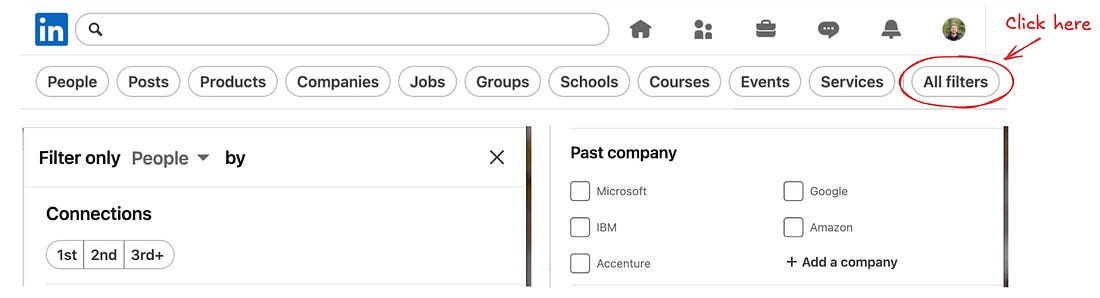
AI use case #13: Assessing the company culture and reputationIf a company isn’t a fit for you culturally, you won’t be able to do your best work. And chances are, you’ll leave before you can even vest your full equity grant. It’s impossible to eliminate this risk completely, but doing some basic due diligence can massively reduce it. As a first step, I recommend talking to people who worked at your target company. You’ll have the best chances of getting a response and an unfiltered view if you reach out to people who 1) are first- or second-degree connections of yours on LinkedIn (so they know you or you can get an intro), and who 2) left the company recently (so they’ll talk more freely). You can do this easily by selecting the corresponding search filters on LinkedIn:
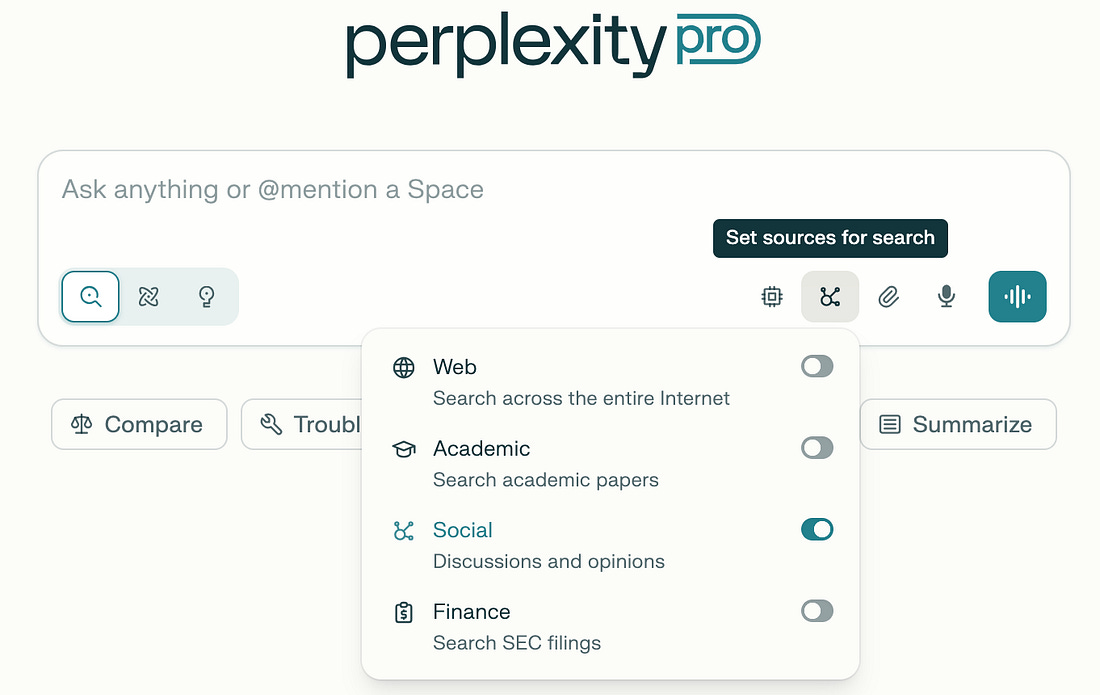
If you can’t find anyone in your network this way, or you want more data points, you can use AI to sift through forums like Reddit, Blind etc. and synthesize what people like and dislike about working there. Perplexity is my go-to for this since you can select what types of sources you want it to focus on:
TL;DRUsing AI to help in your job hunt isn’t about cheating, or letting the AI do everything end-to-end. Instead, the idea is to have a personal assistant and interview coach available 24/7 to remove a lot of the friction from the process. You’re still at the center of it all; but since you’re outsourcing most of the grunt work, you can focus your time on the pieces with the highest ROI. Plus, you can apply to more jobs simultaneously without compromising when it comes to effort and customization. I know job hunting can feel like an uphill battle at times, so hopefully this guide helps level the playing field a bit. [1] P.S. Some of you might be wondering if using AI in this way is “cheating”. My answer is a definitive “No”: - I’m not suggesting you use AI to cheat during interviews, or use it to write deliverables that are supposed to showcase your thinking, but rather to automate a lot of the grunt work that comes with job hunting - Top-tier companies want to hire AI-fluent people, so using AI creatively like this is an argument in your favor - Companies use AI to screen applicants, so using AI as a candidate only levels the playing field [2] I find copy-pasting the actual content of the postings into a document safer than just using a spreadsheet with links since LLMs sometimes say they checked out a link but didn’t actually do it.
You're currently a free subscriber to next play. For the full experience, upgrade your subscription.
|
A practical guide to using AI in your job hunt
Sunday, 7 September 2025









Subscribe to:
Post Comments (Atom)


No comments:
Post a Comment